How to Get a Birth Certificate in Qatar Online: Step-by-Step Guide (2026)
Congratulations on your new baby! 🎉 Once the excitement settles, one of the first things you need to do is get your baby’s birth certificate. Without it, you can’t apply for your baby’s passport or Qatar ID.
The good news: in Qatar you can apply online, from your phone, without standing in a queue. In this guide, I explain the full process step by step, in simple words, based on the official user manual from the Ministry of Public Health (MOPH) and Hamad Medical Corporation.
Quick note: steps and rules can change. Always follow what the official MOPH website shows when you apply. This guide is for general information only.
Quick answer
- Where to apply: the MOPH birth certificate e-service: eservices.moph.gov.qa
- When: once your baby is 48 hours old
- What you need: your QID (or passport if you are a visitor), a mobile number for the OTP, and the baby’s hospital number
- Cost: payment is needed only if you ask for extra copies
- Where to collect: the delivery hospital you choose in the form. You get an SMS when it’s ready.
From birth to Qatar ID: the full journey
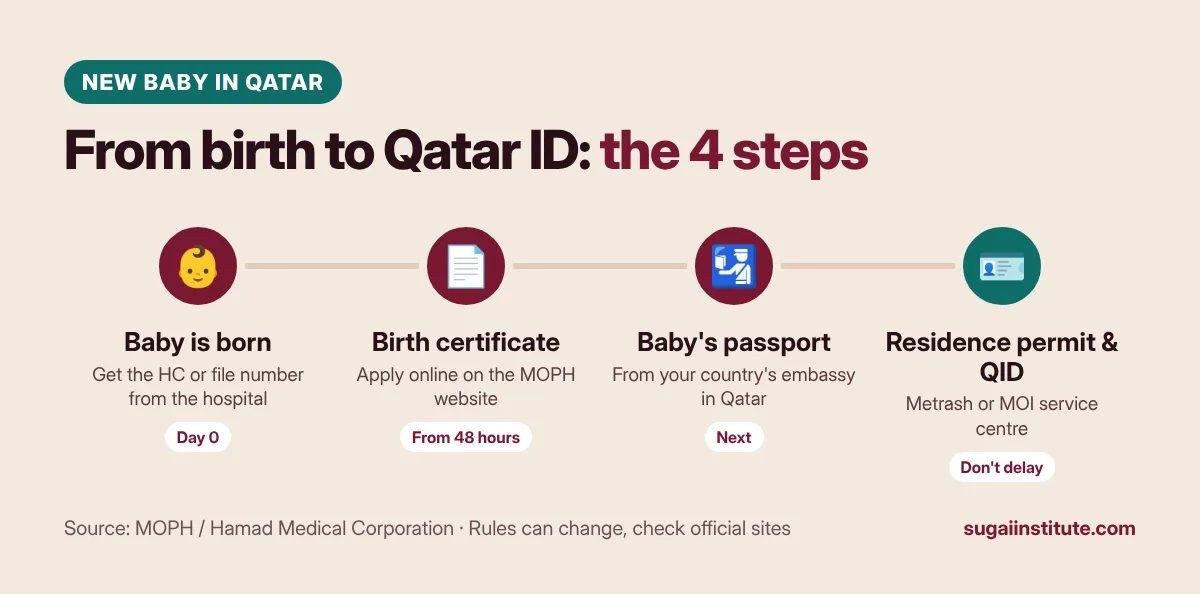
Many parents think the birth certificate is the last step. It’s actually the first. Here is the order for expat parents living in Qatar:
- Birth certificate from MOPH (this guide)
- Baby’s passport from your country’s embassy in Qatar
- Baby’s residence permit and Qatar ID from the Ministry of Interior (Metrash or an MOI service centre)
Documents to keep ready
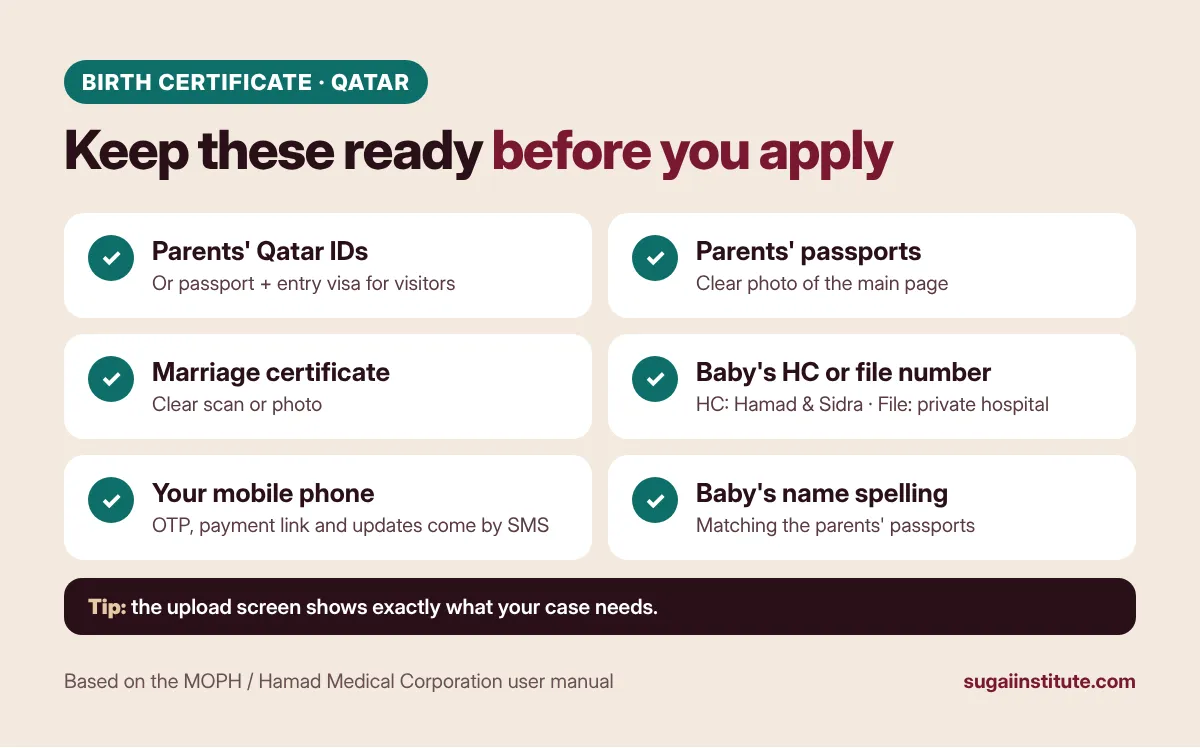
The online form has an Upload Documents step. Keep clear photos or scans of these on your phone before you start:
- Father’s and mother’s Qatar ID (or passport and entry visa for visitors)
- Father’s and mother’s passports
- Marriage certificate
- Baby’s HC number (Hamad or Sidra) or file number (private hospital), and the notification of birth from the hospital
The upload screen tells you exactly what it needs for your case, so follow what it asks.
How to apply online: step by step
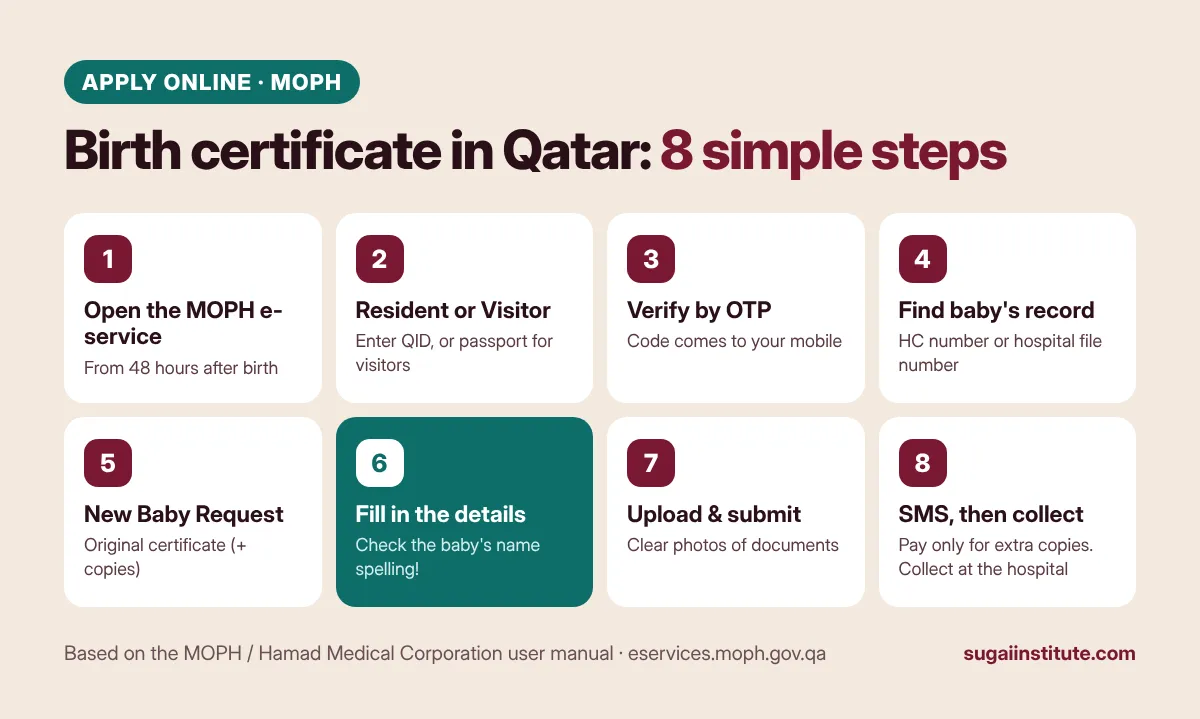
Step 1: Open the MOPH birth certificate page
Go to the MOPH birth certificate e-service. You can apply once the baby is 48 hours old. Change the language to English if needed.
Step 2: Choose who is applying
Select Citizen/Resident if you have a Qatar ID, or Visitor if you don’t.
- Residents enter the QID number and QID expiry date.
- Visitors enter the passport number and passport expiry date.
Step 3: Verify your mobile number
Enter your mobile number. MOPH sends a one-time password (OTP) by SMS. Enter it and click Confirm. If it doesn’t arrive, click Re-send OTP.
Tip: use a number you’ll keep active. The payment link and the “ready to collect” message also come to this number.
Step 4: Find your baby’s birth record
- Baby born at Hamad hospitals or Sidra: choose HC and enter the baby’s HC number, the baby’s date of birth and the mother’s ID details.
- Baby born at a private hospital: choose File and enter the file number, the baby’s date of birth and the mother’s ID details.
Step 5: Choose the request type
- New Baby Request: the original birth certificate (plus extra copies if you want them). This is the one most parents need.
- Update Baby Request: to change a request you already sent.
- Request Copies: only extra copies, if you already collected the original.
Step 6: Fill in the details
You go through these screens one by one: Baby Details, Mother’s Details, Father’s Details, Informant Details (the person applying) and Delivery Details. Some fields are greyed out because they come from the hospital record. Use the small hint icon next to a field if you’re not sure what to write.
Check the spelling of the baby’s name very carefully. The same spelling goes on the passport and Qatar ID, and corrections later take time. Make sure it matches the parents’ passports.
Step 7: Upload documents and submit
Upload the documents, confirm, and submit the request to MOPH.
Step 8: Pay (only for extra copies) and collect
If you asked for extra copies, MOPH sends an SMS with a payment link. After the request is processed (and paid, if needed), you get an SMS telling you to collect the certificate from the delivery hospital you selected.
After the birth certificate: what’s next?
1. Baby’s passport
Apply for your baby’s passport through your country’s embassy in Qatar. Each embassy has its own process and documents, so check its website. Indian parents can start with the Embassy of India in Doha’s website.
2. Residence permit and Qatar ID
Once the passport is ready, apply for the baby’s residence permit through Metrash or an MOI service centre. A Ministry of Interior official has said a newborn should get a residence permit under the father’s sponsorship after getting the documents from the embassy, and that without a residence permit, the baby can’t re-enter Qatar after travelling.
Don’t delay this step. There is a time limit for a newborn’s residence permit, with fines after it. Many guides mention 60 days from birth. Check the current rule in Metrash, and plan any travel only after the baby’s residence permit is done.
Common mistakes to avoid
- Spelling mistakes in the name. Check every letter before you submit.
- Using a phone number you don’t check. All updates come by SMS.
- Waiting too long. The passport and Qatar ID depend on the birth certificate, and the residence permit has a deadline.
- Booking travel too early. Wait until the baby’s residence permit is done.
- Blurry document photos. Use clear, full-page photos so the request isn’t held up.
Frequently asked questions
When can I apply for the birth certificate?
According to the official MOPH user manual, you can apply online once the baby is 48 hours old.
Do I have to pay for the birth certificate?
The official manual says payment applies only to additional copies. You get a payment link by SMS if you request extra copies.
Where do I collect the certificate?
From the delivery hospital you select in the Delivery Details step. You get an SMS when it’s ready.
I am on a visit visa. Can I apply?
Yes. Choose “Visitor” and use your passport number and expiry date instead of a QID.
My baby’s name is wrong on the certificate. What do I do?
Use the “Update Baby Request” option if the request is still in process, or contact the MOPH birth registration office at the hospital. Only MOPH can correct the record.
Have another question?
Ask me in the Sugai Question Box. I’ll reply by message, voice note or article.
Sources
- Hamad Medical Corporation / MOPH: New Born Registration System, Informant User Manual (PDF)
- Ministry of Public Health: Birth certificate e-service
- Gulf Times: MOI official on residence permits (including newborns)
- Doha Guides: Qatar birth certificate (for reference)
Pictures: illustrations by Sugai Institute, based on the official MOPH / Hamad Medical Corporation user manual. Information checked in November 2026. Please confirm the latest steps on the MOPH website before you apply. This article is general guidance, not legal advice.
Questions and comments
No comments yet. Ask your question above and I’ll reply.